
Welcome to Fohlio’s new Project-Centric Navigation experience. This updated interface is designed to help teams work faster and more efficiently by keeping everything related to a project accessible from one centralized workspace.
Instead of navigating through multiple menus and disconnected pages, the new layout keeps your most important project tools, workflows, and actions connected and easier to access.
What Changed?
The new experience centers everything around your project.
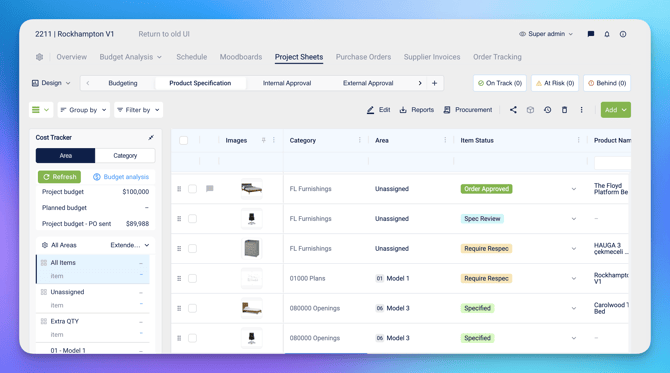
Using the new top navigation bar, you can quickly move between key project areas including:
- Project Sheets
- Moodboards
- Schedule
- Purchase Orders
- Supplier Invoices
- Budget Analysis
- Client Invoices
- Sales Codes
- Procurement workflows
Everything is now accessible within the same project workspace, helping reduce unnecessary navigation and page switching.
Project Sheets
Project Sheets remain the main workspace for managing specifications and project data.
You still have access to:
- Dashboards
- Phases
- Cost Tracker
- Column management
Administrators can also continue reviewing role permissions and visibility settings for each user role.
Updated Actions & Tools
Several project actions have been reorganized to create a cleaner and more intuitive interface.
Add Button
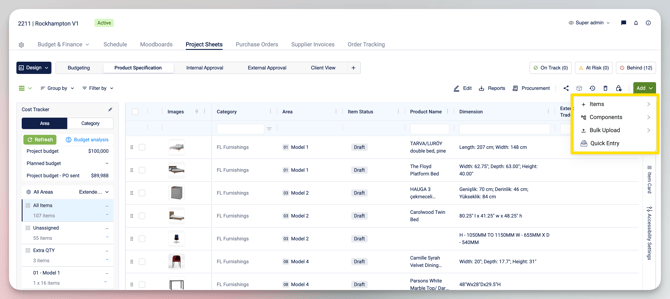
The main Add button is now highlighted in green on the top-right corner for easier access.
From here, users can:
- Create new items
- Add components
- Perform bulk edits
- Add project data quickly
Action Icons
Additional actions such as:
- Edit
- Reports
- Procurement
- Shared Library
- Update History
- Activity Logs
- Trash
have now been moved into simplified icon-based controls.
New Project Filters
New filtering options are available on the top-right side of the workspace.
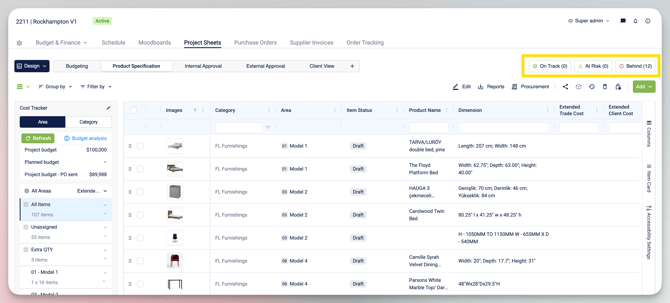
These filters are connected to the new Project Management and Scheduling workflows, allowing users to:
- Track items by project phase
- Filter based on schedules
- Organize items more efficiently
Faster Navigation Between Modules
One of the biggest improvements in the new UI is the ability to move between project areas without leaving the current project context.
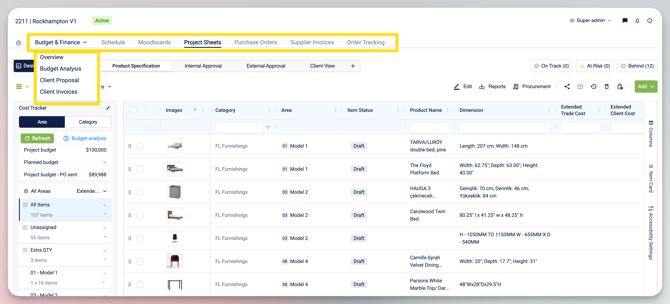
For example, users can move between:
- Project Sheets
- Purchase Orders
- Budget Analysis
- Procurement
with a single click — without needing to reload or navigate across multiple pages.
This helps create a more connected workflow across design, procurement, and project management.
New Schedule Tab
The new Schedule tab is part of Fohlio’s Project Management and Project Scheduling features.
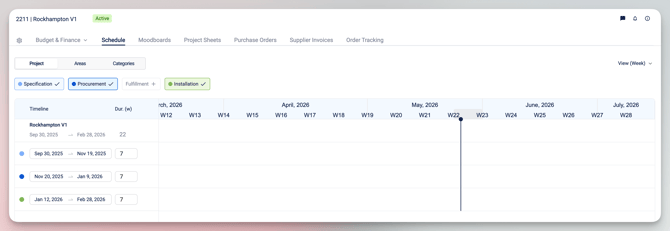
Users can now:
- Set timelines for project phases
- Track Specification, Procurement, Fulfillment, and Installation stages
- Add or remove project phases
- Set start and finish dates
- Monitor project progress by item status
Additional scheduling workflows and tracking features will be covered in separate tutorials.
Project-Based Filtering
All views within the new Project-Centric Navigation are automatically filtered by the current project.
This means when switching between projects:
- Purchase Orders
- Supplier Invoices
- Budget Analysis
- Procurement data
- Scheduling information
will automatically update based on the selected project.
Benefits of the New Experience
The new UI was designed to help teams:
- Work faster with fewer clicks
- Stay focused within a single project workspace
- Navigate more easily between workflows
- Reduce page switching and loading times
- Access tools through a cleaner, more intuitive interface
- Improve visibility across project phases and procurement workflows